Classes · Your team
Instructors
Instructors is the list of people who teach your classes. Each person can also have their own login to see the classes they teach.
Adding someone
- 1Open Instructors and type their name. If it's just you, add yourself.
- 2Add their email if you want them to have their own login. We'll send them an invite when you add them.
- 3Tap Add.
What they teach
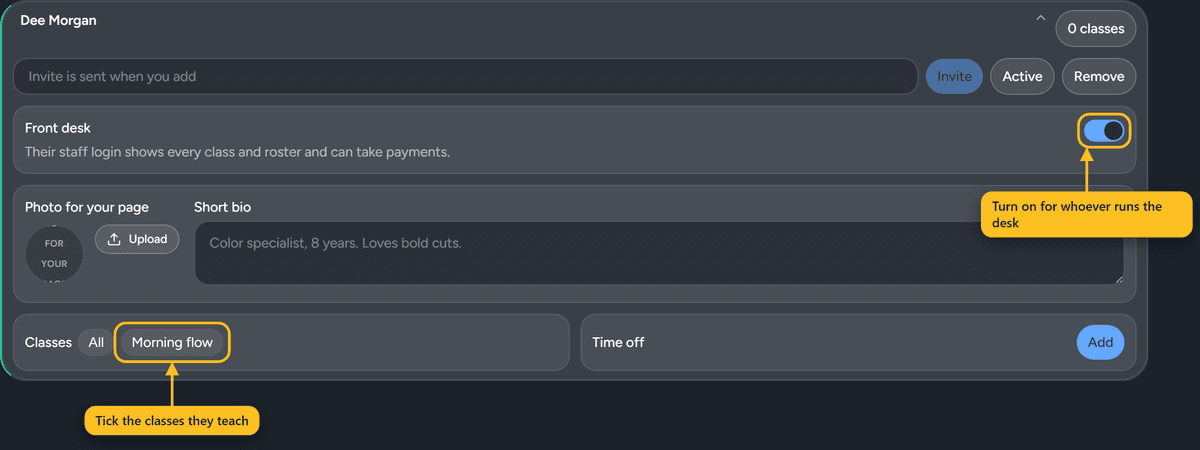
Under Classes, tap the ones this person teaches. All means every class, including ones you add later.
Their own login
When you add an email, they get an invite. They open it, choose a password, and they're in. After that, they sign in from Staff login at the bottom of the ServeSlate site.
A normal instructor login only shows the classes that person teaches. They can't see your settings or your money.
Front desk
Turn on Front desk for anyone who runs the desk. Their login then shows every class, and they can add walk-ins and check people out.
Time off
Use Time off for holidays. Classes they teach stay on the schedule until you cancel them or give them to someone else, so nothing gets canceled by surprise. Instructors can add their own time off from their login too.